Reorder Booking Steps
The Reorder Booking Steps feature in Mysched allows you to fully customize the flow of the booking process, making it easier to adapt to your business needs. There are 7 steps in the default booking form, but you may not need to use all of them depending on the nature of your business. For instance, if you only have one location or a small team of staff, you can hide the unnecessary steps or change their order to create a more efficient booking experience.
How to Reorder the Booking Steps
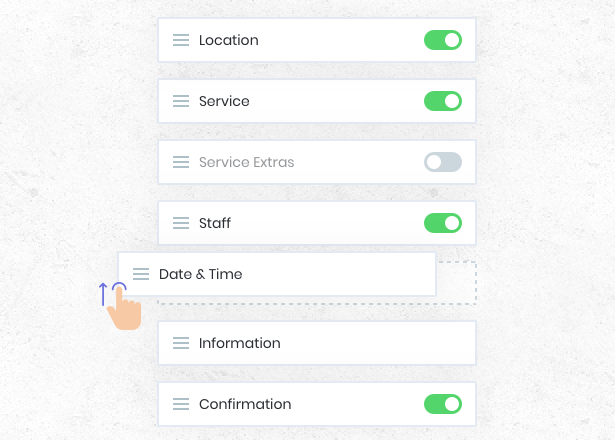
Mysched offers a simple drag-and-drop interface for reordering the booking steps. You can adjust the steps by grabbing the move icon next to each step and dragging it up or down based on your preferences. The system will automatically adjust the flow without causing any complications, ensuring a smooth experience for both you and your customers.
Steps in the Booking Form:
- Location: Choose the location of the appointment.
- Staff: Select the staff member.
- Service: Pick the service being booked.
- Date: Select the appointment date.
- Time: Choose the time of the appointment.
- Extras: Add additional services or options.
- Information: Collect customer details.
Reordering Example
Let’s say you want the Staff selection to come before the Service. When a customer selects a staff member first, only the services offered by that staff member will appear in the following step. Similarly, if you reorder the Date step, only the staff or services available on the selected date will be displayed in the subsequent steps.
This flexibility allows you to tailor the booking process to your business needs, whether you're prioritizing staff availability, specific services, or other factors.
Hiding Unnecessary Steps
If certain steps are irrelevant to your business, you can easily turn them off. For example:
- Location: If your business operates in only one location, you can disable this step entirely.
- Staff: If you do not offer staff-specific booking, this step can also be turned off.
Please note that while most steps can be hidden, the Date, Time, and Information steps are required and cannot be turned off.
Flexibility Without Complexity
Despite the flexibility offered by this feature, the system remains intuitive. Even when the order of the steps changes, the booking panel dynamically adjusts to reflect the dependencies between steps. For instance:
- When Staff is chosen first, only their services are displayed.
- If Service is chosen first, only the relevant staff members for that service will be listed.
Likewise, when a date is selected, the system will only show staff or services that are available on that date, ensuring a smooth and logical progression through the booking process.
Conclusion
The Reorder the Booking Steps feature empowers you to tailor the booking process to fit your business model. Whether you need to remove irrelevant steps or adjust the order to streamline the experience, Mysched makes it easy to customize the flow while maintaining system integrity. The drag-and-drop functionality and ability to hide steps ensure that your booking form is both user-friendly and efficient.
For further assistance or customization tips, feel free to reach out to our support team.